Storage decisions rarely feel urgent — until something goes wrong.
An app starts responding slowly. A storage invoice doubles without warning. A backup job fails right before it is needed. These problems have different symptoms, but they often trace back to the same root cause: the storage type did not match the workload.
Block storage and object storage are the two most common options in cloud environments. On paper they seem interchangeable. In practice, using one where the other belongs creates problems that compound over time.
Here is what separates them — and how to figure out which one your situation actually calls for.
Block Storage
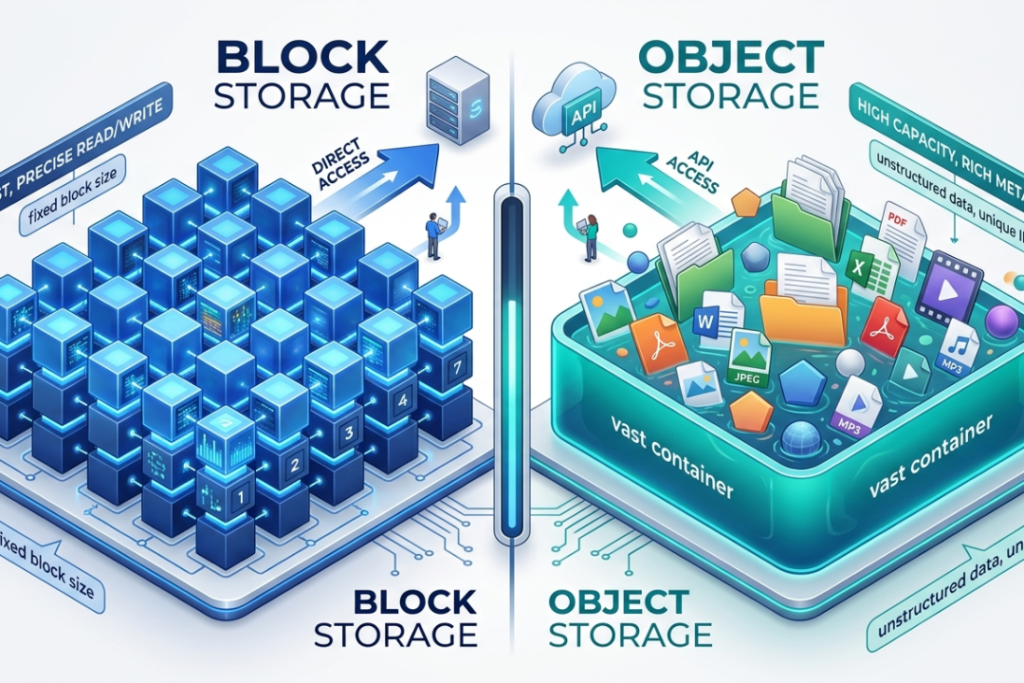
Your laptop does not store files as single units. It breaks each file into small pieces, scatters them across the drive and logs the address of every piece in a table. Opening a file means pulling all those pieces back together. The whole thing happens in milliseconds.
Cloud block storage follows that same logic.
Data is divided into equal-sized chunks. Each chunk — called a block — gets its own ID. A lookup table records every address. When an application requests data, the system traces the right blocks and reconstructs them on the spot.
What makes this fast is the absence of extra steps. The server connects to storage directly, the way it would connect to a physical drive. No internet requests bouncing back and forth. Just immediate access.

A logistics company tracking shipments in real time is a practical example. Thousands of status updates hit the database every hour. Drivers scan packages, warehouses log arrivals, customers check delivery windows — all at once. The database needs to read and write without any lag. Block storage is built for exactly that kind of continuous, high-volume activity.
The cost side is less appealing. You reserve a volume upfront and pay for the whole thing, empty space included. Expanding that volume later is possible, but it involves manual steps and occasional downtime.
Object Storage
Object storage handles data differently from the ground up.
Rather than splitting files into pieces, it preserves each one as a complete unit — an object. That object contains the file, a set of descriptive details called metadata and a unique identifier. Everything goes into a bucket, which is essentially a flat container with no internal folder structure.
Retrieving a file means sending an API request. The system matches the request to the right object and returns it. The round trip takes longer than a direct block-level read, but for certain workloads that delay is completely acceptable.

A documentary production company archiving raw footage is a good example. Files run into hundreds of gigabytes. They get stored once, rarely opened again, but must remain accessible and intact for years. Block storage would make that expensive very quickly. Object storage holds the same data at a much lower cost and automatically keeps redundant copies across separate locations.
One thing worth knowing upfront: partial edits are not possible. Changing any part of an object means uploading the entire file again as a replacement. For content that stays mostly static after upload, this is rarely an issue. For data that updates frequently, it rules object storage out entirely.
Direct Comparison
| Block Storage | Object Storage | |
| How data is stored | Fixed-size blocks | Whole objects with metadata |
| Access method | Direct server connection | API over the internet |
| Speed | Very fast | Slower |
| Scalability | Manual, has limits | Automatic, virtually unlimited |
| Cost model | Pay for reserved space | Pay for actual usage |
| Metadata | Very limited | Rich and customizable |
| Suited for | Databases, VMs, live apps | Archives, media, backups, logs |
How to Decide
Start with the data itself.
Records that update constantly — orders, user profiles, transactions — belong on block storage. Files that get created once and rarely touched — videos, documents, backups — are better placed in object storage.
Think about access frequency.
An application hitting storage hundreds of times per minute needs block storage. A system that pulls data a few times a day can work perfectly well with object storage at much lower cost.
Consider how much the data changes.
Regular updates favor block storage. Content that stays the same after upload does not need the speed or price tag that block storage brings.
Factor in long-term volume.
Object storage becomes increasingly cost-effective as data grows. Block storage stays predictable in cost but can get expensive if the volume scales significantly.
When Both Make Sense
Some applications genuinely need both — and building with that in mind from the start avoids a lot of rework later.
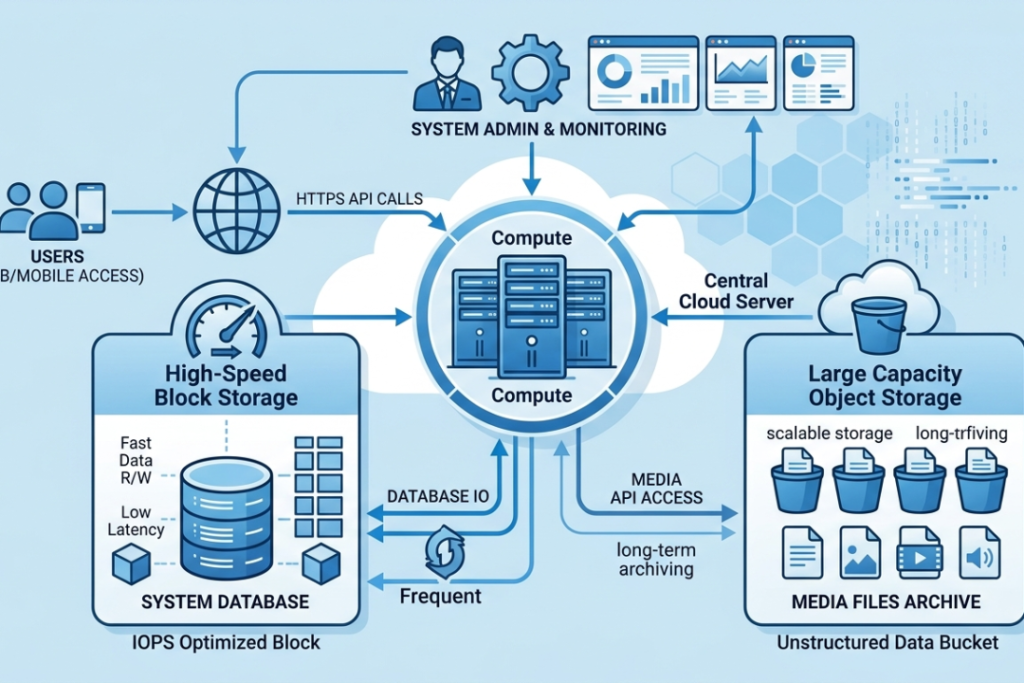
A subscription news platform is a clear example. The database holding subscriber accounts, article drafts and publishing schedules runs on block storage. Editors update stories, new accounts get created and payment records change daily. Speed and consistency matter there. Meanwhile, the archive of published articles, photos and audio recordings sits in object storage. That content does not change after publication, but there is a lot of it and it needs to stay accessible indefinitely without inflating costs.
Neither storage type is doing the wrong job. Each one is handling what it was actually designed for.
Conclusion
Block storage suits workloads that demand speed and handle data that changes regularly. Databases, virtual machines and real-time processing all fall into this category naturally.
Object storage suits workloads where volume and long-term cost matter more than response time. Archiving, media storage, backup systems and static content delivery are where it performs best.
The decision usually becomes clear once you look honestly at your data — what type it is, how frequently it moves and how much of it you expect to accumulate. Those three factors point toward the right answer in most cases.
FAQ’s
Which responds faster?
Block storage. The direct connection to your server removes the delay that comes with routing requests over the internet. Object storage is slower by design — it prioritizes scale over speed.
Does object storage always cost less?
For large volumes, yes. Pricing is based on actual usage rather than reserved capacity. Block storage charges for the full volume regardless of how much space you fill.
Why is object storage unsuitable for databases?
Databases modify small pieces of data constantly. Object storage does not support partial updates — every change requires replacing the full file. That makes response times far too slow for database operations.
Is it practical to use both in one application?
Very much so. It is a standard setup in production environments. Block storage runs the database and core systems. Object storage handles media, archives and files that do not change often.
Which offers better long-term data protection?
Object storage replicates data across multiple locations automatically as part of its standard operation. Block storage supports redundancy too, but it typically requires deliberate configuration to achieve the same result.