
A website’s foundation starts with the hosting you choose. The hosting you pick plays a big role in your website’s speed, reliability, security and future growth. Shared hosting and cloud hosting are two of the most common options. Both can run a website but they work in very different ways and fit different needs.
This guide shows the difference between cloud hosting and shared hosting in an easy way.
Understanding Cloud Hosting and Shared Hosting
Before comparing them, let’s first understand what each type of hosting is.
What Is Shared Hosting?
Shared hosting means your website is hosted on a single server along with many other websites. All websites on shared hosting use the same system power, including processing speed, RAM and disk space.

It’s like having your own room in a house that you share with others. You have your own space but utilities are shared with others.
Shared hosting is popular because:
- It is affordable
- It is easy to use
- The hosting provider manages everything for you
It works best for small websites with low to moderate traffic.
What Is Cloud Hosting?
Cloud hosting runs your website on multiple connected servers, not just one. Your website can use resources from multiple servers whenever needed.

If one server has an issue, another server steps in automatically. This setup improves reliability and performance.
Cloud hosting is designed for:
- Growing websites
- Traffic spikes
- Better speed and stability
Common Features of Both Hosting Types
Even though they work differently, shared hosting and cloud hosting have several things in common.
- Managed environment
The hosting provider handles server maintenance and updates. - Customer support
Most hosting companies provide support all day and night through chat or tickets. - Uptime guarantees
Both usually offer uptime commitments. - Data center usage
Both use professional data centers to store website files.
Cloud and shared hosting are both fine for small or personal websites.
Differences Between Cloud Hosting and Shared Hosting
It mainly depends on how the server resources are handled.
Resource Allocation:
- Shared hosting: It means multiple websites rely on the same server resources.
- Cloud hosting: Resources are spread across multiple servers and allocated when needed.
Performance:
- Shared hosting is fine for small sites but it may slow down when other sites take up too many resources.
- Cloud hosting keeps your site stable and fast, even with heavy traffic.
Traffic Handling:
- Shared hosting: Has limits traffic spikes can affect site speed.
- Cloud hosting: Growth is easy and flexible.
Scalability:
- Shared hosting: You need a bigger plan to grow.
- Cloud hosting: Growth is easy and flexible.
Security
- Shared hosting: Secure enough for basic websites.
- Cloud hosting provides extra security and backups.
Cloud Hosting vs. Shared Hosting: Comparison Table
| Feature | Shared Hosting | Cloud Hosting |
| Resource usage | Shared on one server | Distributed across multiple servers |
| Performance | Good for small sites | Faster and more stable |
| Traffic handling | Limited | Handles traffic spikes |
| Scalability | Limited | Highly scalable |
| Security | Basic protection | Advanced, multi-layered |
| Control | Limited customization | More flexibility |
| Management | Fully managed | Managed or semi-managed |
| Price | Low cost | Higher cost |
| Best for | Beginners, small sites | Growing and business sites |
Performance, Scalability and Reliability Explained Simply
- Performance affects how fast your site loads.
- Scalability determines how easily your site can grow.
- Reliability ensures your site stays online.
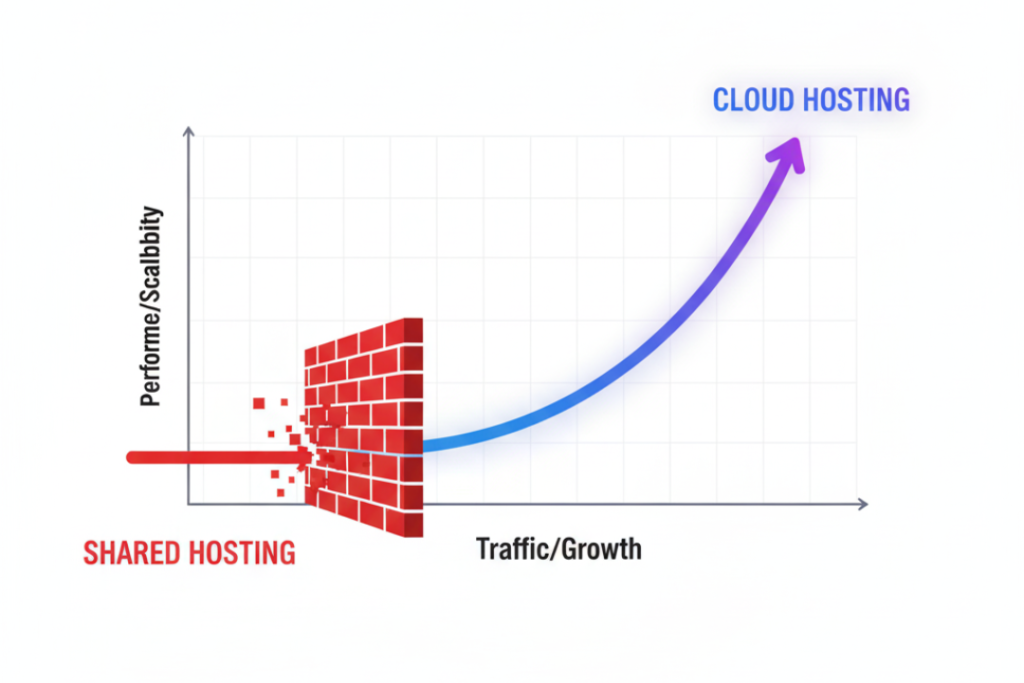
Shared hosting works well when traffic is predictable. Cloud hosting is better when traffic changes or grows over time.
Pricing Differences: Cloud Hosting vs Shared Hosting
- Shared hosting is more affordable because the server’s power is divided between multiple sites.
- Cloud hosting is more expensive because it uses multiple servers but it’s worth it for sites that need speed and reliability.
When Should You Choose Shared Hosting?
Shared hosting is a good choice if:
- You are starting your first website
- Your site has low traffic
- You want a low cost solution
- You prefer a simple, fully managed setup
When Should You Choose Cloud Hosting?
Cloud hosting is a better option if:
- Your website is growing
- You expect traffic spikes
- Performance and uptime are important
- You run a business or ecommerce site
When to Upgrade from Shared to Cloud Hosting
You may want to upgrade when:
- Your website becomes slow
- Visitor numbers increase
- You need more resources
- You plan long term growth
Many websites start on shared hosting and move to cloud hosting as their needs grow.
Shared vs. Cloud Hosting for Different Use Cases
- Blogs and personal sites: Shared hosting is usually enough.
- Business websites: Cloud hosting offers better stability.
- Ecommerce stores: Cloud hosting handles traffic and reliability better.
- Mobile or dynamic apps: Cloud hosting is more suitable.
Final Thoughts:
Shared hosting and cloud hosting are good for different kinds of websites. It works well for small websites and beginners who need a low cost, simple hosting solution. Best for sites that need to grow, stay fast and stay reliable. It depends on your site’s size, traffic and plans for growth.
Frequently Asked Questions
Does hosting type affect SEO?
Yes. A website that loads fast and stays up consistently gives a better experience, helping your SEO.
Is cloud hosting faster than shared hosting?
In most cases, yes especially during traffic spikes.
Is it possible to upgrade from shared hosting to cloud hosting later?
Yes. Most hosting providers support migration.
Is shared hosting secure?
Yes, for small and basic websites.
Which hosting is better for WordPress?
Shared hosting is good for small WordPress sites. Cloud hosting is better for growing ones.