
Security is usually the first thing people worry about when picking a hosting service. And honestly, that makes sense. Breaches, ransomware, malware attacks — these are not rare anymore. If you run a website, especially one that handles customer data, getting hacked is not just an inconvenience. It can destroy trust overnight.
So people want to know — is cloud hosting actually safe to use?
For the most part, yes. Cloud hosting sits among the more secure options available right now. The big providers pour money into encryption, firewalls, monitoring and backup systems. But security is never a simple yes or no answer, and understanding how it works gives you a much clearer picture of what you are actually getting.
What Is Cloud Hosting?
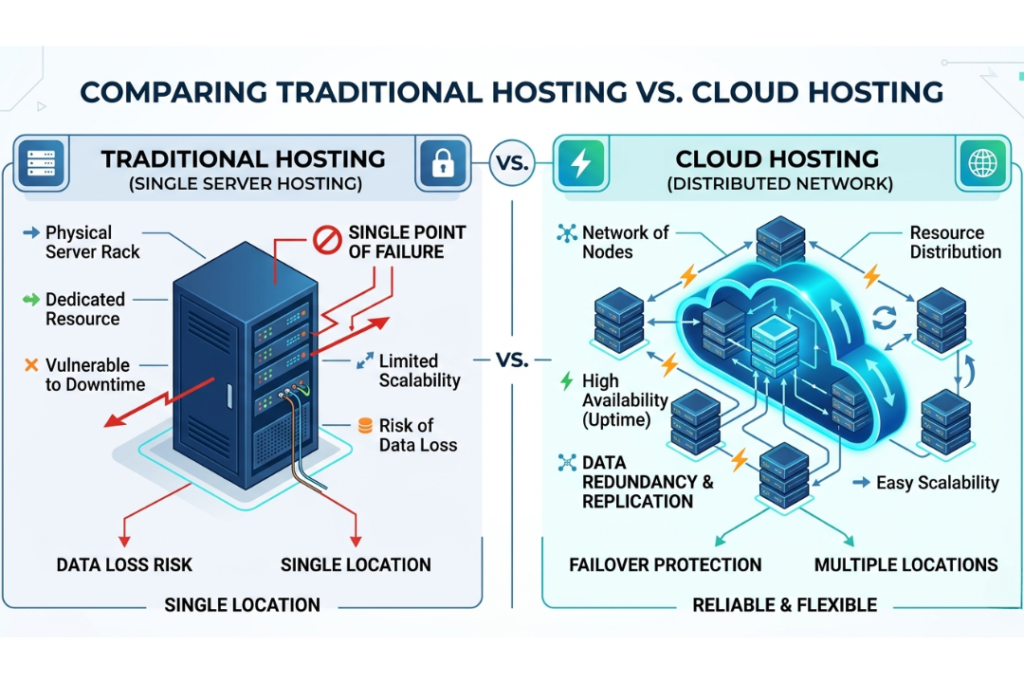
Instead of running your website on one physical server, cloud hosting spreads everything across a network of connected servers. One goes down, the others keep things running. Visitors on your site do not notice anything happened.
That setup alone — not depending on a single machine — is part of what makes cloud hosting more dependable and more secure than older hosting models.
So Is It Secure?
When managed properly, absolutely.
The established providers spend heavily on security infrastructure that most businesses simply could not build themselves. What you get is protection across multiple layers — not just one wall between your data and the outside world.
The setup is designed to block unauthorized access, catch suspicious behavior early, keep data available through redundancy, recover from failures quickly and defend against the kind of attacks that take sites offline. None of that is perfect, but it is a serious level of protection.
One thing worth keeping in mind though — the provider handles the infrastructure. What happens on your end of things is still your responsibility.
Why Cloud Hosting Holds Up on Security
Your data is not sitting in one place
This is probably the biggest security advantage. Data gets distributed across multiple servers. A failure in one location does not take everything down with it. Less risk of data loss, less risk of unexpected downtime.
Redundancy is built in
Most providers automatically copy data across multiple servers in different locations. Hardware fails somewhere — your data is still safe elsewhere and your site keeps running.
The physical data centers are heavily protected
These are not just regular server rooms. We are talking about facilities with round the clock surveillance, biometric entry, security staff, environmental controls and strictly limited access. The kind of physical security that most organizations could never afford to replicate.

Someone is always watching
Cloud environments get monitored continuously. Automated systems scan for unusual logins, suspicious activity and signs of malware. Problems get flagged and dealt with before they spiral.
Updates happen automatically
New vulnerabilities in software get discovered all the time. Cloud providers push patches automatically so systems stay covered without you having to think about it.
DDoS attacks get filtered out
These attacks try to overwhelm servers with traffic until they go offline. Most cloud platforms have DDoS protection built in that filters malicious traffic and keeps the site available even during an attack.
Security Features Worth Knowing About
- SSL Certificates — encrypts everything passing between your site and your visitors. Passwords, payment info, personal details. If your site shows HTTPS, SSL is doing its job.
- Data Encryption — data gets converted into unreadable code. Even if someone intercepts it, they cannot do anything with it. Most providers encrypt data both while it moves and while it sits in storage.
- Firewalls — act as a filter between your server and incoming traffic. Blocks access attempts that look suspicious before they reach anything sensitive.
- Multi-Factor Authentication — logging in requires more than just a password. A code sent to your phone, for example. One compromised password is no longer enough to get in.
- Access Controls — admins can decide who sees what. Tighten this down and the chances of someone accessing something they should not drop significantly.

Cloud Hosting vs Traditional Hosting
| Security Feature | Traditional Hosting | Cloud Hosting |
| Data Storage | Usually stored on a single server | Distributed across multiple servers |
| Data Redundancy | Limited | High |
| Failover Protection | Limited | Strong |
| Scalability | Limited | Excellent |
| DDoS Protection | Basic | Advanced |
| Backup Options | Varies by provider | Often included |
| Uptime Reliability | Moderate | High |
| Disaster Recovery | Slower recovery | Faster recovery |
| Monitoring | Basic monitoring | Continuous monitoring |
| Overall Security | Good | Generally stronger |
Traditional hosting puts everything on one server. That server has a bad day, your website has a bad day. Cloud hosting does not have that single weak point. For anything that needs to stay online and stay protected, cloud hosting is the more solid choice.
Risks That Still Exist
Cloud hosting is strong but it is not invincible. A few things can still go wrong.
- Weak passwords — still one of the most common ways accounts get broken into. Use something complex and do not reuse it across accounts.
- Misconfigured servers — wrong settings create gaps that attackers can slip through. Regular reviews catch these.
- Malware from bad software — old plugins, sketchy themes, unpatched applications. Any of these can introduce malware into your environment.
- Outdated software — known vulnerabilities in software that has not been updated are basically an open invitation. Keep things current.
- Too many permissions — when too many people have access to too much, the risk of something going wrong goes up. Only give access to people who genuinely need it.
Things You Can Do on Your End
Use strong passwords. Turn on multi-factor authentication. Keep your CMS, plugins and themes updated. Back up your data regularly. Limit who has access to what. Check your login logs occasionally for anything that looks off.
None of this is complicated. But skipping any of it leaves gaps that the provider cannot cover for you.
Picking the Right Provider
Security quality varies between providers. When comparing options look for SSL support, DDoS protection, automated backups, encryption, some form of security certification, 24/7 monitoring, disaster recovery and support that actually responds when something goes wrong.
A provider that takes security seriously removes a lot of the risk before you even have to think about it.
What About Small Businesses?
Cloud hosting works well here. Small businesses get access to the same enterprise-level security features without needing to invest in hardware or hire a dedicated IT team.
Secure data centers, automatic backups, built-in monitoring, scalable resources — all of it comes with the package. Solid protection at a cost that makes sense.
Frequently Asked Questions
Is cloud hosting safer than shared hosting?
Generally yes. Better redundancy, stronger security features and more reliable uptime make cloud hosting the safer option in most situations.
Can cloud hosting be hacked?
Nothing is completely immune. But reputable providers layer their defenses in ways that make a successful attack much harder to pull off.
Does cloud hosting include backups?
Most providers offer them, though what exactly is included varies. Check before committing to a plan.
Is it secure for ecommerce websites?
Yes. Encryption, secure payment support, strong uptime and backup options make it well suited for online stores.
Does cloud hosting protect against DDoS attacks?
Most platforms have DDoS mitigation built in. Malicious traffic gets filtered before it can take the site down.
Conclusion
Cloud hosting is one of the more secure ways to host a website. Distributed infrastructure, redundancy, encryption, continuous monitoring and built-in security tools cover a lot of ground.
No setup is completely foolproof. But a reliable provider combined with sensible security habits on your end puts you in a genuinely strong position.
For businesses, online stores and growing websites, cloud hosting brings security, reliability and flexibility together in a way that holds up over time.