Cloud computing makes it easier for businesses to use technology. Instead of buying expensive servers, they can use resources online when they need them. This approach saves time , reduces cost and makes scaling much easier.
Infrastructure as a Service (IaaS) is one of the most popular cloud models today. It lets businesses run servers , store data and manage networks , all without touching any physical hardware.
This guide explains everything about IaaS in simple , clear language.
What Is IaaS in Cloud Computing?
IaaS stands for Infrastructure as a Service.It is a cloud model where you rent computing infrastructure instead of buying it. This infrastructure includes servers , storage and networking , all delivered through the internet.
You don’t worry about hardware setup or maintenance. The provider handles all of that. You just use the resources you need and pay for them as you go.
In simple words:
IaaS lets you use powerful computers online without owning them.
IaaS gives you:
- Virtual servers
- Online storage
- Networking resources
- Flexible , pay-as-you-use pricing
What Does “As a Service” Mean?
The phrase “as a service” means you use something without owning it. Traditional IT works differently. Companies buy servers , set them up and manage everything themselves. That takes time , money and a dedicated team.
With IaaS , the provider owns the machines. You just use them when you need them.
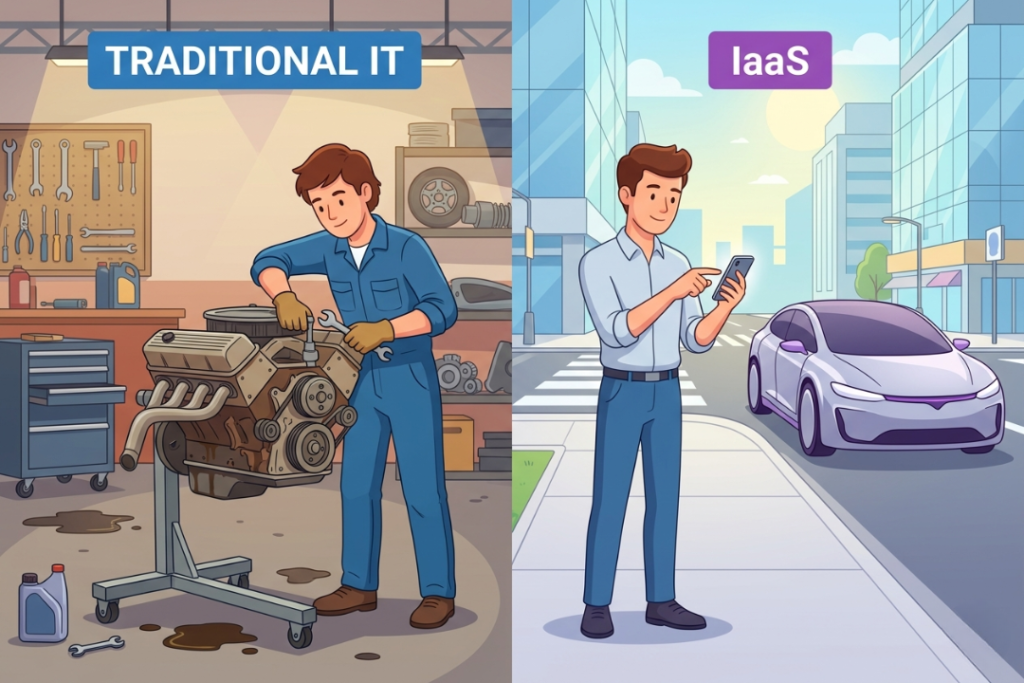
Simple example:
Buying servers is like owning a car.
You pay upfront , handle repairs and deal with maintenance yourself. IaaS is like using a ride-sharing service. You use it when needed and only pay for that ride.
With IaaS:
- Provider manages hardware and data centers
- You manage your apps and data
- No upfront hardware cost
- Easy to upgrade or downgrade anytime
A Quick History: How IaaS Started
In the early days of the internet , every business had to buy its own servers. That was expensive. It was slow. And it needed full-time staff just to keep things running. Then internet speeds improved in the early 2010s. Businesses began putting their software online and web traffic grew very fast.
Companies needed more hardware fast. That’s when cloud providers started offering infrastructure over the internet. Instead of buying servers , businesses could simply rent them. That was the beginning of IaaS and it changed the entire tech industry.
How IaaS Works (Step by Step)
IaaS works in a simple way and everything happens online. You choose the resources you need, the provider sets them up for you and you use them through the internet.
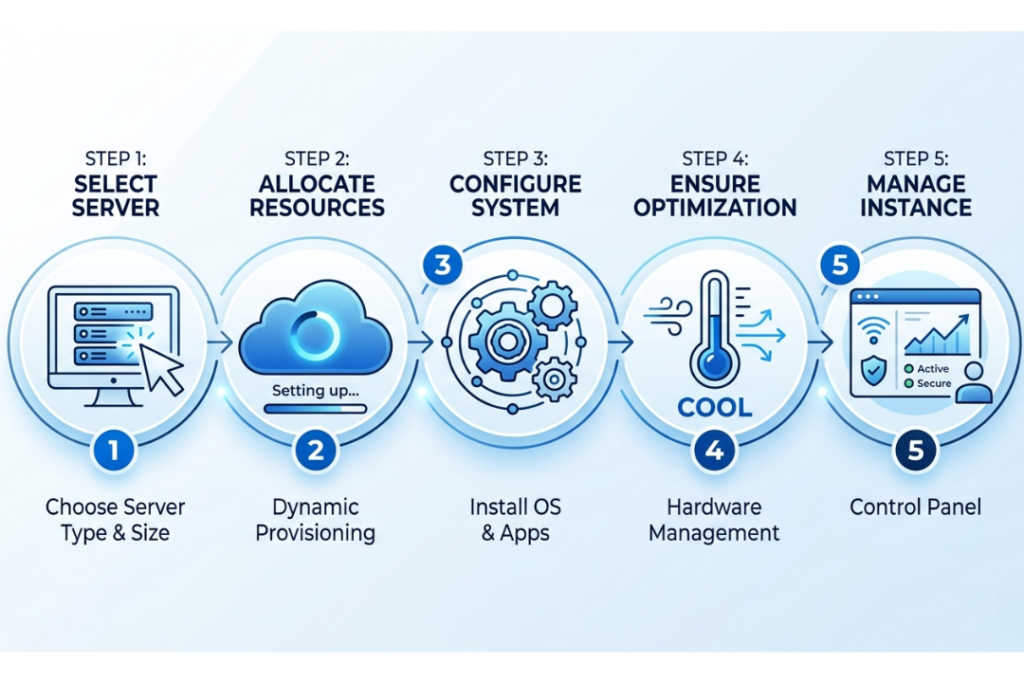
Here’s how it works:
- You choose server size , storage and network settings
- The cloud provider creates virtual resources instantly
- You install your software and applications
- The provider handles hardware , power and cooling
- You manage everything through a simple control panel
- No waiting weeks for new equipment. No complicated setup.
You can get resources in just a few minutes.
Core Components of IaaS
IaaS is built on several key parts that work together. Each one plays a specific role in keeping your systems running smoothly and securely.

Main components include:
- Virtual Machines (VMs) – Act like real servers but run fully in the cloud
- Storage – Saves your files , databases and backups online
- Networking – Connects your servers to users and the internet
- Virtualization – Splits one physical server into many virtual ones
- Security and Monitoring – Protects your systems and tracks usage
Benefits of IaaS
IaaS offers real advantages for businesses of all sizes. Because everything is online , companies can respond fast and grow without delays.
Key benefits include:
- Cost savings – No hardware to buy or maintain
- Scalability – Add or reduce resources anytime , instantly
- Speed – New servers are ready in minutes , not weeks
- Disaster recovery – Easy data backup across multiple locations
- High reliability – Multiple data centers reduce the risk of downtime
- Less maintenance – Provider handles all physical infrastructure
Drawbacks of IaaS
IaaS is powerful , but it comes with some challenges too. Businesses need to understand these before making a decision.
Possible drawbacks:
- Security responsibility – You must secure your own apps and data
- Provider dependency – If the provider goes down , your services are affected
- Unexpected costs – Poor usage management can raise your monthly bill
- Internet dependency – No internet means no access to your infrastructure
- Integration challenges – Older systems may need changes to work with IaaS
IaaS vs Traditional IT Infrastructure
Traditional IT means buying servers , building data centers and maintaining hardware yourself. It is slow , expensive and hard to scale. IaaS removes all of those problems by providing ready-to-use infrastructure online.
Main differences:
| IaaS | Traditional IT | |
| Upfront Cost | Low , pay as you go | High , buy hardware first |
| Setup Time | Minutes | Days or weeks |
| Scalability | Instant | Slow , needs new hardware |
| Maintenance | Provider handles it | Your team handles it |
| Disaster Recovery | Built-in options available | Complex and costly to set up |
IaaS vs PaaS vs SaaS
Cloud services come in three main models. Each one offers a different level of control and management.
Understanding the difference helps you pick the right option for your business.
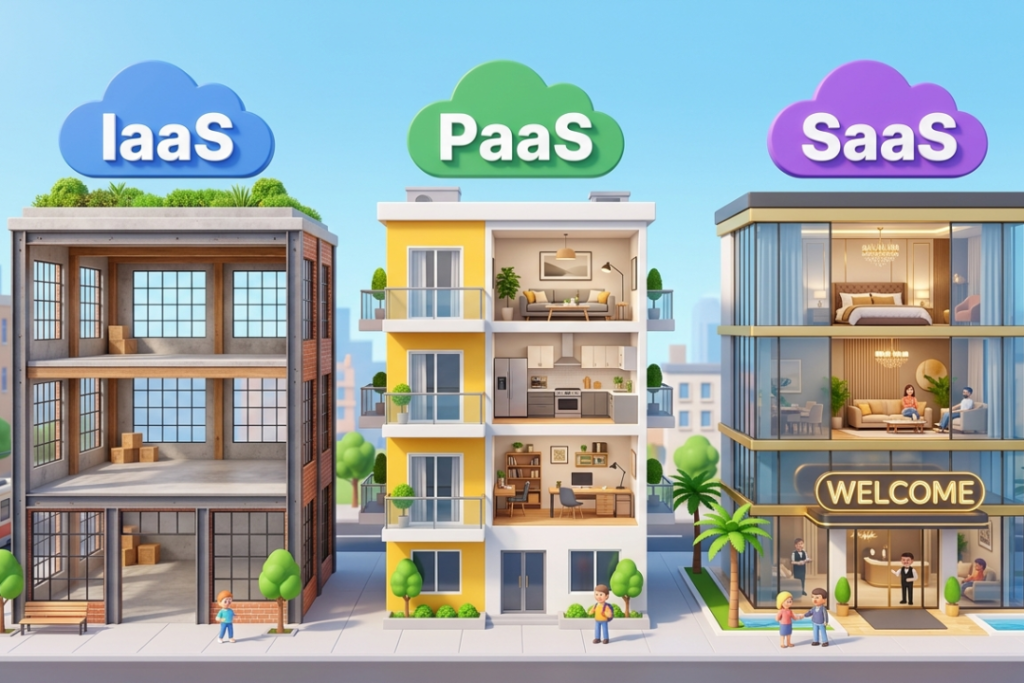
Quick comparison:
| IaaS | PaaS | SaaS | |
| What you get | Infrastructure | Development platform | Ready-made software |
| Who manages hardware | Provider | Provider | Provider |
| Who manages apps | You | Shared | Provider |
| Best for | IT teams , developers | App developers | End users |
| Examples | AWS , Azure | Heroku , App Engine | Gmail , Zoom , Shopify |
Simple example: IaaS is an empty apartment. You furnish it yourself. PaaS is a furnished apartment. The basics are already there. SaaS is a hotel room. Everything is set up and ready to use.
Common IaaS Use Cases
IaaS works well in a lot of real-life situations, especially when you need to be able to change things. Companies often use IaaS when their workloads change a lot or when they expect to grow quickly.

Some common uses are:
- Startups that don’t have to pay a lot for hardware at first
- Businesses that are getting bigger and have traffic that changes a lot
- Environments for development and testing that need to be set up quickly
- Websites that get a lot of traffic and need to grow during busy times
- Companies that deal with a lot of data and store and process a lot of it
A real-life example is that an online store expects a lot of traffic on Black Friday. They use IaaS to add more servers before the rush. They can handle thousands of orders without crashing. After the sale , they scale back down and only pay for the extra capacity they actually used.
Popular IaaS Providers
Many large companies offer IaaS services worldwide. Each provider has different strengths and pricing.
Top providers:
- Amazon Web Services (AWS) – Largest provider with the biggest range of services
- Microsoft Azure – Best for businesses already using Microsoft tools
- Google Cloud (GCP) – Strong in data analytics and AI
- DigitalOcean – Simple and affordable , great for startups
- IBM Cloud – Popular in healthcare , finance and enterprise
- Oracle Cloud (OCI) – Best for large enterprise workloads
Who Should Use IaaS?
IaaS is not for everyone , but it is a great fit for many types of businesses.
IaaS is ideal for:
- Small businesses avoiding hardware investment
- Startups that need to launch fast and grow later
- Large enterprises managing heavy or changing workloads
- Developers needing quick test and development environments
- Companies with old hardware ready to move to the cloud
How to Get Started With IaaS
Getting started with IaaS is simpler than most people think.
Two main paths:
Path 1 – Use a third-party provider (recommended for most) Sign up with AWS , Azure or Google Cloud. Choose your resources. Start building. Begin small , test everything and then migrate more systems gradually.
Path 2 – Build your own IaaS (for large organizations) Use tools like OpenStack or VMware on your own hardware. This gives more control but needs bigger investment in staff and equipment.
Before you start , ask yourself:
- How much storage and computing power do I need?
- Where are my users located?
- What is my monthly budget?
- Do I need strong customer support?
Key Takeaways
- IaaS lets businesses rent infrastructure instead of owning it
- You get servers , storage and networking , all over the internet
- It saves money , speeds up growth and removes hardware headaches
- Main risks are unexpected costs , security responsibility and vendor lock-in
- Top providers include AWS , Azure , Google Cloud and DigitalOcean
- For many companies , IaaS is the first smart step into cloud computing
Frequently Asked Questions
Do I need technical skills to use IaaS?
Basic knowledge helps , but many providers offer managed services that handle most technical work for you.
Is IaaS secure?
Yes , when you follow security best practices. The provider secures the hardware. You need to keep your apps and data safe yourself.
Is IaaS expensive?
It depends on how you manage it. If you monitor usage carefully , IaaS is very cost-effective. Poor management can lead to higher bills.
Can I scale easily with IaaS?
Yes. Scaling is one of IaaS’s biggest strengths. You can add or remove resources in minutes.
What is the difference between IaaS and SaaS?
IaaS gives you raw infrastructure that you control and manage yourself. SaaS gives you ready-to-use software with no management needed.